 Captions and PDFs
Why PDFs, documents and media need their own care
Last reviewed
Quick take
- A web page has built-in structure. A PDF, a Word file or a video often doesn't.
- Documents need structure that software can read: headings, order and tags.
- Recorded media needs text versions: captions, transcripts and descriptions.
- Fixing the file at the start is much easier than repairing it later.
Your web page may be fine, and the file may not
Say your site has a clean "Opening hours" page. Then you add a PDF menu. The page works with a screen reader. The PDF might not.
A screen reader is software that reads a screen out loud, or sends it to a braille display. It needs a file to say what each part is. A heading, a list and a table all need a label that software can find.
Downloads don't always carry those labels. And videos and recordings bring a different problem: some people can't hear them, and some can't see them.
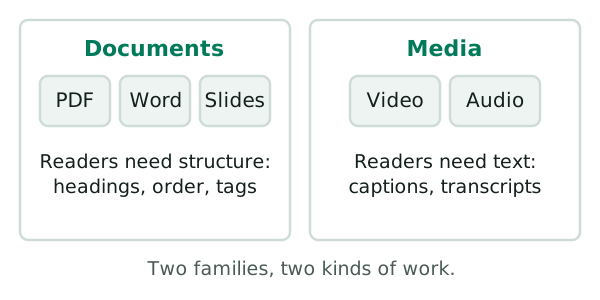
Documents: the order can go wrong
A PDF can look perfect and still be a jumble to a screen reader. The meaning sits in a hidden layer called tags. Tags are labels that say "this is a heading" or "this is a table". That hidden layer is created when a document is saved as a tagged PDF.[1]
Order is the clearest example. Picture a page with two columns. You read down the first, then down the second. A screen reader with no tags may read across both columns as if they were one.[1] The words come out mixed up.
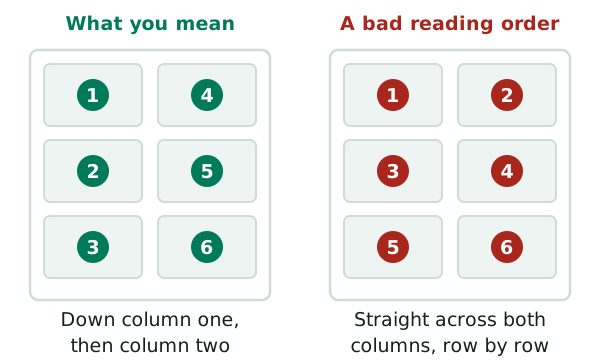
When the order is wrong, people using keyboards or assistive technology may not understand the content at all.[1] The next page, making a PDF accessible, shows how tags and order are set.
Media: sound and picture need words
A video has two channels. If a person can't hear, they miss the sound. If a person can't see, they miss the picture.
Captions fix the first problem. They are a text version of the speech and of the other sounds a viewer needs.[2] Audio description fixes the second. It tells blind viewers what is shown on screen.[3]
Neither one comes for free. Someone has to write them. The pages in the Video and audio section show how.
Ask first: does it need to be a file?
Sometimes the best fix is no file at all. One U.S. government guide says PDFs are often not the most accessible or mobile-friendly option.[4] Ask whether a plain web page would do the job.
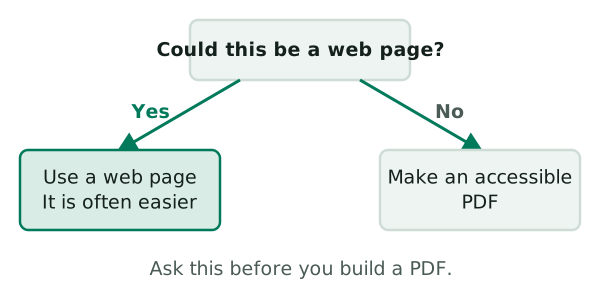
If you do need the file, build it well from the first draft. Start with Word files that convert well.
Sources
- PDF3: Ensuring correct tab and reading order in PDF documents, W3C Web Accessibility Initiative (accessed 2026-11-10)
- Captions/Subtitles, W3C Web Accessibility Initiative (accessed 2026-11-10)
- Description of Visual Information, W3C Web Accessibility Initiative (accessed 2026-11-10)
- Create Accessible PDFs, Section508.gov (U.S. General Services Administration) (accessed 2026-11-10)